
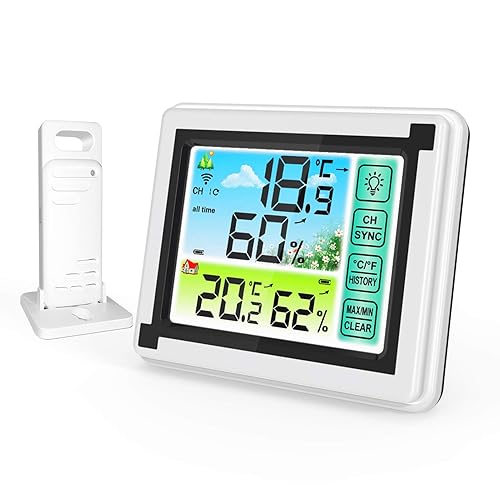
Estación meteorológica inalámbrica para interiores y exteriores, termómetro con sensor remoto, monitor digital de temperatura y humedad
4
Desde $ 41.694 /mes
Total: $ 166.777
Marca
La Crosse Technology, Ltd.
Categoría
Estaciones MeteorológicasTiempo de entrega estimada Martes 14 de abril al Lunes 20 de abril.
Precio y formas de pago
4 partes mensuales sin intereses
4 pagos de
$ 109.194
/ mesAliados para comprar ahora y pagar después


Compra segura
Protección total en tu pago y tu pedido.
Cuotas flexibles
Elige entre pago único o hasta 4 partes.
Envío verificado
Cobertura nacional con seguimiento en cada etapa.
Tiempo de entrega estimada Martes 14 de abril al Lunes 20 de abril.
Compras Empresariales — Estaciones Meteorológicas
Solicite una cotización para su empresa
Producto electrónico La Crosse Technology y Ltd. 308-1414B con wi-Fi
Desde $ 41.694 /mes
Total: $ 166.777

Desde $ 1.172.694 /mes
Total: $ 4.690.777

Desde $ 65.194 /mes
Total: $ 260.777

Desde $ 48.944 /mes
Total: $ 195.777

Desde $ 50.694 /mes
Total: $ 202.777

Desde $ 206.444 /mes
Total: $ 825.777
Desde $ 133.194 /mes
Total: $ 532.777
Producto electrónico La Crosse Technology y Ltd. 308-1414B con wi-Fi
¿De qué marca es?
La Crosse Technology, Ltd.
¿Qué color tiene?
Negro.
¿De qué material está hecho?
Plástico.
¿Cuánto pesa?
6,0 libras, aproximadamente 2,7 kg.
¿Cuáles son sus dimensiones?
2.24 x 8.36 x 5.49 pulgadas, aproximadamente 5.7 x 21.2 x 13.9 cm.
¿Qué calificación tiene?
4,4 de 5 con 11.835.
¿En qué categoría destaca?
Tiene una posición destacada en Estaciones Meteorológicas, donde aparece en el puesto #18.
| Campo | Valor |
|---|---|
| Tipo de fuente de energa | Batería |
| Característica especial | Inalámbrico |
| Número | 3 AAA (Tipo de pila necesaria) |
| Precisin de la temperatura | 33.8 °F |
| Estn incluidas las bateras | No |
| Tecnología de sensores | Wi-Fi |
| Temperatura superior de servicio | 140 Grados Fahrenheit |
| Tipo de visualizacin | LCD |
| Precisin de lectura de temperatura | plus_minus_1_degree_celsius |
| Tipo de pulverizador y esparcidor | Estación |
| Forma del producto | Rectangular |
| Dimensiones del artículo profundidad x ancho x alto | 2,24"prof. x 8,36"an. x 5,49"al. pulgadas |
| Usos especficos del producto | Humedad del aire |
| Número de identificacin de comercio global | 00757456083278, 00757456089317 |
| Número de pieza | 308-1414B-INT |
| Total del paquete segn la medida elegida para referenciar precio | 1.0 Conteo |
| Nombre Tipo Artículo | La Crosse Technology 308-1414B - Estación inalámbrica atómica digital de pronóstico de color con alertas, color negro |
| SKU | B00MUOIQ8W |
| Modelo | 308-1414B |
La pantalla a todo color te da temperaturas y humedad actuales, con un pronóstico futuro si podría ser soleado o lluvioso o nevado. Cuenta con una hora y fecha atómica precisas y autoconfiguradas con actualizaciones automáticas de DST. Registra valores mín/máximos y te alerta de temperaturas extremas. También muestra su índice de calor y punto de rocío. Indicará batería baja y resistencia de recepción. Requiere pilas (no incluidas). ).Explicación del reinicio de fábrica de la estación meteorológica: ¿El reinicio de fábrica devuelve la estación meteorológica y el sensor exterior a un "out-of-the-box"? estado predeterminado y, a menudo, resuelve un problema. Reinicio de fábrica: 1. Retire toda la energía (baterías y CA) del sensor exterior y la estación meteorológica. 2. Presione uno de los botones de la estación meteorológica al menos 20 veces para borrar toda la memoria. 3. Verifique que la estación meteorológica esté en blanco antes de continuar (es posible que haya líneas pintadas en la pantalla que se mostrarán cuando no haya energía). 4. Deje ambas unidades sin energía durante 15 minutos (muy importante). 5. Inserte el cable de alimentación de CA en el tomacorriente de pared y luego en la estación meteorológica. 6. Inserte baterías nuevas en el sensor exterior. 7. Presione el botón TX en el sensor exterior para transmitir la señal de RF. 8. Mantenga el sensor exterior a 5-10 pies de la estación meteorológica. 9. Cuando se establece la conexión de RF, la temperatura aparecerá en la estación. Permita que el sensor exterior y la estación meteorológica se sientan juntos durante 15 minutos para establecer una conexión fuerte. 10. No presione los botones durante 15 minutos. Para una transmisión óptima de 433 MHz, coloque el sensor exterior a no más de 300 pies (298.6 ft, al aire libre) de la estación meteorológica Explicación: El reinicio de fábrica devuelve la estación meteorológica y el sensor remoto a un estado predeterminado "listo para usar" y, a menudo, resuelve un problema. Reinicio de fábrica: 1. Retire toda la energía (baterías y CA) del sensor remoto y la estación meteorológica. 2. Presione uno de los botones de la estación meteorológica al menos 20 veces para borrar toda la memoria. 3. Verifique que la estación meteorológica esté en blanco antes de continuar (es posible que haya líneas pintadas en la pantalla que se mostrarán cuando no haya energía). 4. Deje ambas unidades sin energía durante 15 minutos (muy importante). 5. Inserte el cable de alimentación de CA en el tomacorriente de pared y luego en la estación meteorológica. 6. Inserte baterías nuevas en el sensor remoto. 7. Presione el botón TX en el sensor remoto para transmitir la señal de RF. 8. Mantenga el sensor remoto a 5-10 pies de la estación meteorológica. 9. Cuando se establece la conexión de RF, la temperatura aparecerá en la estación. Permita que el sensor remoto y la estación meteorológica se sientan juntos durante 15 minutos para establecer una conexión fuerte. 10. No presione los botones durante 15 minutos. • Para una transmisión óptima de 433 MHz, coloque el sensor remoto a no más de 328.1 ft (330 pies) de la estación meteorológica. Nota: En Montaje/Posicionamiento Sensor remoto Primero: Coloque el sensor remoto en la ubicación sombreada deseada y la estación meteorológica en el hogar. Espere aproximadamente 1 hora antes de montar permanentemente el sensor remoto para asegurarse de que haya una recepción adecuada. POSICIÓN Exterior: • Proteja el sensor remoto de la lluvia o la nieve estancada y del sol superior, lo que puede hacer que se lea incorrectamente. • El montaje debajo de un riel de alero o cubierta funciona bien. • Si lo desea, puede construir un pequeño techo o caja para el sensor remoto. Asegúrese de que una caja tenga ventilaciones. • Monte el sensor remoto en el lado norte para evitar que el sol cause lecturas incorrectas. • Monte al menos 6 pies en el aire para una señal de RF (radiofrecuencia) fuerte. • No monte el sensor remoto en una valla metálica. Esto reduce significativamente el rango efectivo. • Los sensores remotos son resistentes al agua, no impermeables
[CLIMA DE COLOR DINÁMICO] Indicador meteorológico con múltiples iconos de pronóstico de color e indicadores de tendencia [Transmisión inalámbrica] Temperaturas interiores y exteriores (°F/°C) con humedad (% RH) y registros MIN/MAX y alertas personalizables; incluye sensor resistente a la intemperie con rango de 330 pies (sin obstrucciones) [PRECISO AL SEGUNDO] Reloj atómico de ajuste automático de hora y calendario con cambio de horario de verano; se muestra en modo de 12 horas/24 horas Ajuste de intensidad de retroiluminación (ALTO/BAJO/APAGADO) ajustable; retroiluminación alimentada únicamente por baterías que se ilumina temporalmente (bajo demanda) para ahorrar energía [ALARMA CON REPETICIÓN] Alarma de tiempo con función de repetición de 10 minutos; adaptador de corriente de 5V para pantalla de características completas (respaldo opcional, requiere 3 pilas alcalinas AAA)
Calificación
4,4/5
Valoraciones
11.835